Showing posts with label MAC. Show all posts

Saturday, 19 May 2012

Free Cloud Storage : Dropbox vs GoogleDrive vs SkyDrive vs SugarSync


Google Drive:
      
      Google Drive comes with 5 GB of free storage . It also include an option to turn on OCR(Optical Character Recognition ) text scanning , which helps you to scan the images for text and make them searchable when you upload a image. In Google Drive you can add files by "Drag-and-Drop" method. Google Drive has a built-in editor feature . Google Drive is available for Windows, Mac, Android and iOS is still on progress. In Google Drive you can open up to 30 file right inside your browser.
GoogleDrive for PC
GoogleDrive for Mobile - Android only


Dropbox:

     Dropbox comes with 2 GB of free storage on sign-up and you get 500MB of free storage for every referrals up to 16GB. So you can extend up to 16 GB of free storage for free account. The strength of the app is it's API built on . The dropbox is the one of the most developer- friendly storage since it helps you to access your files everywhere. The files are secured with SSL AES 256- bit encryption. Dropbox offer 50 GB and 100GB of storage for $9.99 and $19.99 which is expensive when compared with other could storage's. You can add file by Drag-and-Drop method. Dropbox is available for iphone ,ipad, Android ,Backberry , Windows , Mac , Linux.
Dropbox for pc
Dropbox for Mobile


SkyDrive:


     SkyDrive comes with 7GB of free storage (Free upgrade of 25GB , if claimed on time). SkyDrive are very good at synchronizing when the documents are created using Microsoft Excel,Word , PowerPoint and OneNote. In SkyDrive you can share public links , view or edit public links. SkyDrive has a special feature known as "Skydrive's Fetch" in which if you forgot to synchronize something and if you home computer is turned-on , you can still access the files.SkyDrive is available for Windows ,Mac ,ipad ,iphone ,Windows Phone.
SkyDrive for Pc- you need to sign-in to get the app.
SkyDrive for Mobile


SugarSync:


     SugarSync comes with 5GB of free storage on sign-up and you get 500Mb of free storage for every referrals up to 32GB , So you can extend up to 32 GB on free storage for free account . SugarSync let you to pick folders all over the computer to synchronize, then let you to choose whether you want to synchronize  each folder to all the devices or to a particular device.You can password protect the file when you are sharing them . It is secured with SSL AES 128- bit encryption.SugarSync is available for Windows , Mac ,iphone,ipad,Android ,Windows Phone,Symbian ,Blackberry.
SugarSync for Windows
SugarSync for Mac
SugarSync for Mobile


Click the below link to view the comparison table:


Free Cloud Storage and Comparisons : Dropbox vs GoogleDrive vs SkyDrive vs SugarSync


Cloud Storage is a model of networked stored online where the information's are stored  in virtual space of storage that are hosted by third-parties. In this post we are going to see few cloud storage services GoogleDrive , Dropbox ,SkyDrive, SugarSync about their feature and are compared with one another.


GoogleDrive VS Dropbox VS SkyDrive VS SugarSync


Google Drive

DropBox

SkyDrive

SugarSync


Free Storage

5GB

2GB

(+ 0.5GB
per Referral up to 16 GB)


7 GB

(Free upgrade to 25GB.
If claimed on time)

5GB

(+0.5 GB per referral up to 32 GB)

Minimum Upgrade Price

25 GB at $2.49/Month

50 GB at $9.99/Month
(or)
$99/year


20 GB to your free storage at $10/year

30 GB at $4.99/month
(or)
$49.99/year


Monthly
Paid Space

25GB – $2.49
100GB – $4.99
200 GB – $9.99
400 GB – $19.99
1000GB – $49.99


50GB – $9.99
100GB – $19.99

20GB – $0.83
50GB – $2.08
100GB – $4.16

30GB – $4.99
60GB – $9.99
100GB – $14.99
250GB – $24.99
500GB – $39.99


File support

MS word ,Excel, PowerPoint, PDF
Photoshop, SVG ,
PostScript, XPS, ZIP, RAR, TIFF, Illustrator.


Photos , videos

MS word, Excel, PowerPoint, OneNote, Photos, Videos


Photos

Online File Manager


YES

YES

YES

YES

Desktop Access


Windows , Mac

Windows , Mac, Linux

Windows ,Mac

Windows ,Mac


Mobile Access

Android,
(ipad and iphone coming soon)

iphone ,
ipad,
Android , Blackberry

ipad ,
iphone ,
Windows Phone

iphone,
ipad,
Android ,
Windows Phone,
Symbian ,
Blackberry


Developer Tools


Yes

Yes

Yes

Yes

Share Folder


Yes

Yes

Yes

Yes


Shared Folders with permission and Password


Yes


No


No


Yes
Limitations

(i)File Size

(ii)Bandwidth


Unlimited

Unlimited


Unlimited

20 GB/day/File


2 GB

Unlimited


Unlimited

20 GB/day/File

Security


N/A

SSL AES-256 bit encryption

SSL

SSL AES-128bit encryption


To download/know more about the service click the link below:

Friday, 11 November 2011

Google Plus Shortcuts


Here are some Google Plus Shortcuts.
  • Google Plus supports Drag and Drop,so you can share links,photos,videos by directly dropping them into Share box.
  • To mention someone in your or other comments use + or @ Symbol before writing their name.
  • Google Plus doesn't have private messages but you can share a post with only specific friends and don't forget to disable Reshare.
  • To get permalink of any post click on the time-stamp of that post.
  • Public and Private posts are differentiated  by colors Green = Public Blue = Limited to circles.
  • To Underline the text write the text in-between two  Underscores  ( _exapmle_  ) - example.
  • To make the text BOLD write the text in-between two Asterisk   ( *example* ) - example.
  • To Display the text with a Strickthrough write the text in-between two Negative sign  (-example-) - example .


    Keyboard Shortcuts
  • Space               =Scroll Down
  • Shift+Space    =Scroll up
  • J                       =Single Post Down Scroll
  • K                      =Single Post Up Scroll
  • Q                      =Jump to Chat
  • Return             =Start Comment

Tuesday, 8 November 2011

[How To]Make Portable Version Application

Cameyo is an application which is used for making Portable Version Application for any Software. The main use of Cameyo is to make portable application , so that they can used whenever required without any installation process. This application is a freeware.
How To Make Portable Version Application:
1.Go to Cameyo.com and download it.
2.Install or Run the program.

3.Choose the Capture Installation option.
4.Now it starts recording the Installation process.
5.Then install the program for which you want to create a Portable Version
6.After Installation Choose the Install done Option.

7.After few minutes a portable version of your installed application will be displayed .
8.Go to Online.cameyo.com and Creating an account (if you don't have) and Log-in.
9.Then Upload the file that you have created .
10.After a few minutes you will receive a mail from Cameyo with your portable version application.
11.Finally download it .
That's it now you can use this application whenever required without any application.

Saturday, 15 October 2011

Access Desktop Remotely


Chrome  Remote Desktop is an extension which is used for accessing the desktop remotely. This application works only in Google chrome browser. With this application you can share and access computer remotely.
How to use Chrome Remote Desktop?
1.Go to the link Chrome Remote Desktop.
2. Install the add-on.
3.Launch the application and choose Continue .
4.Log-in using your GMail ID.

(Choose Allow Access)
5.Select to get the access code.

6.To Enter the Access Code choose Access a Shared Computer.

Support : Windows, Mac,Linux.

NOTE:
*Both the user's must be online in order to share and access remotely.

Tuesday, 7 June 2011

[How To]Password Protect Files using WinRAR


Thought there are many software available in the internet for protecting the folder using password ,one can also protect the folder by password using WinRAR application. WinRAR has a built-in feature for protecting the files/folders by password.
Instructions to setup password:
1.Select the files and folders that you want protect.
2.Right click and select the Add To Archive option.
3.Type the file name in General tab.
4.In Advanced Tab , Choose Set Password option.


5.Type the password and select the Encrypt option , Click OK.
Now the file is protected .

Wednesday, 25 May 2011

Free Antivirus For Mac


Sophos is an security application for Mac Users , which is used for protecting against malicious objects. Sophos is a free and real-time application for protecting Mac from any malicious objects .Sophos protects your computer from viruses , worms ,Trojan , Adware , spyware ,etc. Sophos antivirus doesn't slow down the computer while scanning and doesn't annoy the user with any messages. Sophos antivirus is an easy-to-use application .

Requirement :
Mac with Intel or power pc processor .
256 MB of Memory.
150 MB available hard-disk Space
Mac OS X 10.4(tiger),10.5(leopard ),10.6(snow leopard)
Support all Apple Mac hardware including iMac ,Macbook, Macbook Pro , MacAir.

Download :Sophos Antivirus

Saturday, 30 April 2011

MacX Video Converter

MacX Video Converter is a free application provided by the Digiarty Softwares. MacX Video Converter is a application only for Mac user only.This is a excellent application which is used for converting various formats to Mac supportable formats.MacX Video Converter  software converts among a diverse array of High-Definition(HD) formats like MKV, AVCHD, M2TS etc and Standard Definitions(SD) formats like .AVI,.MPEG,.MP4,.Dvix ,.Xvid, .MOV, .FLV , .RM, .RMVB , webM , Google TV etc.
MacX Video Converter software also consists of formats that support Quick Time Player and iphone 4 .
With MacX Video Converter you can even customize the video quality by tweaking Video or Audio parameter according to personal demands.


Download : MacX Video Converter


Tuesday, 26 April 2011

Free Audio And Video Converter For All OS

Format Factory is an excellent application which is used for converting as well as repairing damaged  Audio , Video , images .One of the main feature is that you can DVD Rip the files . This is a Multifunction Media Converter which include lot a file formats. You can even merge or join the files using Format Factory. Format Factory is a freeware application and an easy to use.


Format Factory's Features:
  • All to MP4/3GP/MPG/AVI/WMV/FLV/SWF/GIF.
  • All to MP3/WMA/AMR/OGG/AAC/WAV.
  • All to JPG/BMP/PNG/TIF/ICO/GIF/TGA.
  • Rip DVD to video file , Rip Music CD to audio file.
  • MP4 files support iPod/iPhone/PSP/BlackBerry format.
  • Supports RMVB,Watermark, AV Mux.Support converting all popular video,audio,picture formats to others.
  • Repair damaged video and audio file.
  • Reducing Multimedia file size.
  •  Support iphone,ipod multimedia file formats.
  • Picture converting supports Zoom,Rotate/Flip,tags.
  • DVD Ripper.
  • Supports 56 language.
OS requirements: All Windows OS
Download: Format Factory

Friday, 1 April 2011

[How to]Share desktop & Remote PC Access


TeamViewer is a simple and fast solution for remote control, desktop sharing and file transfer that works behind any firewall and NAT proxy. To connect to another computer just run TeamViewer on both machines without the need of an installation procedure.With the first start automatic partner IDs are generated on both computers. Enter your partner's ID into TeamViewer and the connection is established immediately. With over 100 million users TeamViewer is a standard tool to give support and assistance to people in remote locations. The software can also be used for presentations, where you can show your own desktop to a partner.

Just Follow the Instructions:
*Team viewer must be installed on both the desktop and remote pc.
1.After the installation , open the Team Viewer.

teamviewer window

(Then you will see the team viewer box as that of above image)
2.You will get a ID and Password . Then ask you partner to open the Team viewer.
3.Your partner will also get Team viewer box as that of the image above with different ID and Password.
4.Type your partners ID in the box which is found below the create session and click connect to partner .
password dialogue box

5.Enter your partner's  password and click Log on.
6.Now your computer is connect with your partner.
*The password and ID will automatically change for every use .
Download :
Windows : TeamViewer
MAC : TeamViewer

Thursday, 10 March 2011

Get essential applications in a single file


Ninite Easy PC Setup is the free service which contains all the essential or must have application in a single file , so that you no need to download from various websites. The only thing you have to do is to select the files that are to be installed in your computer.With Ninite Easy Pc Setpup  you can install all the softwares selected by you and that too without any additional applications (i.e)Toolbar .
Just follow the steps:
1.Go to the site: www.ninite.com
2.Select the softwares you want to install and then download your customized installer.
3.After downloading, run your installer and it will do everything for you.
window displaying sofwares


installation dialogue box

SUPPORTS:
Windows Xp/Vista/7
MAC
Linux

Monday, 28 February 2011

Convert any files to PDF,Word etc... (using Google)

logo

One of the best way of sending a documents with write protect is through PDF. Because PDF files cannot be changed or edited , so most of the people choose PDF. To make the PDF files you need applications , but Google offers it for free for converting any documents to PDF. All you need to have is Gmail Account.
Just Follow the steps :
Step1 : Google to http://docs.google.com .
Step 2: Login using your Google Account.
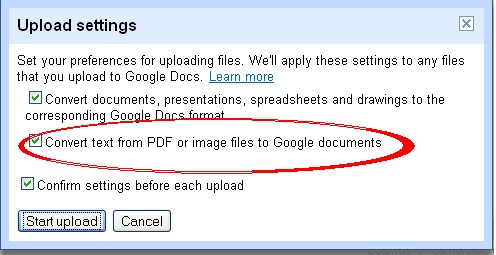
Step 3: Upload the file that you want to be converted into PDF / Word etc...upload option

Then Drag and Drop the files which you want to convert.
drag and drop window


Step 4: Go to file -> Action -> Download as...
displaying formats


These are the file types that can be converted to Google Docs:
For spreadsheets: .xls, .xlsx, .ods, .csv, .tsv, .txt, .tsb
For documents: .doc, .docx, .html, plain text (.txt), .rtf
For presentations: .ppt, .pps (.pptx and .ppsx is not supported)
For drawings: .wmf
For OCR: .jpg, .gif, .png, .pdf

*If you want to Know more about Google Docs:-
Download :Google Docs

Sunday, 27 February 2011

Reset the administrator Password (Windows/MAC)

logo

Ophcrack is a free Windows password cracker based on rainbow tables. It is a very efficient implementation of rainbow tables done by the inventors of the method. It comes with a Graphical User Interface and runs on multiple platforms as well as live-cd.

Just Follow the steps below:
1. First download the ophcrack which is given below.
2. Make the cd of the image you downloaded.Then restart your PC and boot from the cd(Hope you know how to do this).
3. It will boot up to linux, and you’ll be able to handle it from there.
4. It might ask you ‘which partition’ you want to scan, just select the partition drive in which your OS is installed and then it automatically start the process.
5. It will find the password for every user on that disc partition.
ophcrack window
Download : Ophcrack